New laptop setup, including antivirus and printer installation

A regular client was bought a new laptop and asked me to visit because he couldn’t figure out Windows 8.1. I went round to visit to help him, give a little tuition, and set things up for him including:

  • Uninstalled the free trial of McAfee LiveSafe –  if your trial runs out and you don’t pay up then you won’t have full antivirus protection
  • Set up free antivirus
  • Installed my recommended additional security software, that prevents unwanted software from being installed – the client already has an annual licence for this for less than £20 per year which allows installation on up to three PCs. This is much better value in my opinion than paying for McAfee or Norton.
  • Installed his printer software – he couldn’t find the CD that came with the printer, so I downloaded the correct version and installed it for him

Remote support to install Adobe Reader and do Java Updates, without the unwanted bundled software.

A regular client was having trouble with her Java Updates and asked me to log in from my office to hers to sort it out. I also installed Adobe Reader at her request. Both of these required me to side-step additional software that Java (Oracle) and Adobe want to install as part of the process. Such additional software is classed as Potentially Unwanted Programs but is commonly known as a virus or trojan; you’re getting the gift of free software (the wooden horse) but it comes with unwanted software (the invading army). All done safely in 20 minutes.

Unwanted software will be installed unless you un-tick (un-check) the option for the “recommended” software. The free software you want, Adobe and Oracle in this case, get paid when the additional bundled software is installed. Adobe and Oracle are reputable companies, but most free software comes with additional software that people don’t want and it’s often hidden. My advice is, if in doubt, ask me to log in and do it for you. It saves time (and money) in the long run.

If you want me to log in and help you, click Home in the menu bar above, and click Get Remote Support Now to install the software. You can phone me on the numbers on the top-right of the screen too.

Miscellaneous problems solved and advice given

Another regular client asked me to visit to sort out the following:

  • Desktop icons were stretched out – solved
  • Laptop running slowly – stopped some programs from running in the background, and advised on a RAM upgrade
  • Hotmail permanently logged in – set it to log out each time so visitors can’t get to email easily
  • Favourites missing – reinstated the favourites and the favourites bar
  • Throw out old cables – advised on what should be kept and what should be recycled following old desktop PC decommissioning.

I could have done all of this via remote support (over the internet) except for sorting out her cables.

Sonos Radio Breaking Up, New Gmail Account, Adding Facebook App to Samsung (Android) phone, Talktalk email problem.

A regular client called me in to sort out several minor problems.

Their Sonos system was breaking up while playing radio stations. I suspect interference from their wireless printer, so we switched off the printer for a week to see if that helps. If so, switch it back on and see if the stuttering radio occurs again. This will be ongoing troubleshooting.

I set up a Google Gmail account for Mrs so we could install the Facebook app on her Samsung Android phone.

Talktalk are changing their email service (again) and emails are taking a long time to get to their account. I advised they should consider moving from Talktalk to Gmail; I advise that everyone should have an email account independent of their ISP (Internet Service Provider) so when they change ISPs they won’t have to move their emails in a hurry.

Non-booting PC – Fixed

A new client’s computer wasn’t booting up properly. Sometimes it would go to a “blue screen of death” and sometimes it would boot up okay, but later the mouse would freeze and and sometimes it would just shut down.

I went to do a free estimate. I suspected overheating, but it turned out it was a hardware fault that I was able to fix there and then.

Revert from Chrome’s New User Tab to Old User Icon

Edit: This changed again in August 2015. For the new post please see here
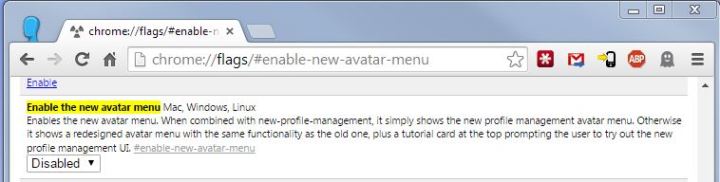
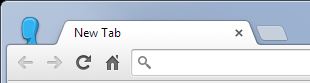
New User TabGoogle Chrome has a new User Tab interface, removing the old user icon from the top-left of Chrome and replacing it with a User Tab on the right. If you use a lot of tabs, the new user tab takes up valuable browser tab space, and switching between users takes three clicks instead of one. Old User IconHere’s how to revert from the “new avatar menu” (as they call it) to the old icons:   Open a new tab and type/paste “chrome://flags/#enable-new-avatar-menu” (without the quotes) where you would normally type in a website address, hit Enter/Return. Disable new avatar menu In the top drop-down box, select Disabled. Then close that tab. Next time you open Chrome, the new User tab will be gone and your your old icon will be back. If you have any problems, please get in touch and we’ll arrange a remote support session for me to do it for you. Please Like, Share, etc

Virus/Malware Removal, Memory Upgrade, Java Update Fix, New PC Set-up

Here’s a few recent jobs that I can remember off the top of my head:

istartsurf Browser Search HijackRemote Virus, Malware, and unwanted programs removal. This image shows a browser search hijack, where instead of opening a Google.com search page it opens a different search page. This was done without the client’s knowledge, probably as a result of downloading free software from somewhere.

Memory upgrade (more RAM).

Remote to fix a Java update that wouldn’t install properly.

New PC setup, including security, and data transfer.

How to see everything on Facebook (not just what Facebook thinks you should see)

By default, Facebook shows you what it thinks are the top stories from your friends. If you want to see everything your friends post with the most recent posts at the top then there’s a temporary option for that on Facebook, or you can bookmark a special link and use that each time. Here’s how to do both…

See everything on FacebookGo to your home page, look under your name and profile picture on the left. To the right of “News Feed” click on the triangle/down arrow, and select “Most Recent”. Or…

Click this link (opens in a new tab) and bookmark it. Then click the bookmark each time you want to go to Facebook or to refresh the page.

For more tips, click on “IT Tips” above.

Please like, share, and follow.

Your Windows 8.1 installation couldn’t be completed – solved

Your Windows 8.1 installation couldn't be completed - solvedIf you can’t upgrade to Windows 8.1 because you get the message “Your Windows 8.1 installation couldn’t be completed. Something happened and the installation of Windows 8.1 can’t be completed”, then I can help. Just go to http://www.bowenracing.com/ and click the “Get Remote Support Now” link. You can then allow me to log in and fix the problem for you.
 

Payment by Paypal or Credit Card accepted.

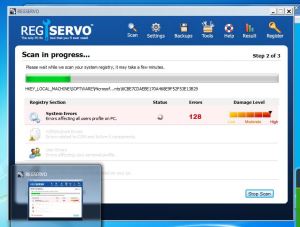
If you see anything like this, then you have a PUP (Potentially Unwanted Program)

RegServo

This is an example of a Potentially Unwanted Program (or PUP). These are generally offered as free scanners or bundled with other free software. PUPs are sometimes referred to as a virus, malware, fakeware or scareware. They offer little or no benefit. Moreover, they slow down the computer and generally annoy you.

Any program that gets onto you system and reports that you have problems is probably reporting fake issues. They generally ask you to register the software to clean up these fake problems, and part of the registration often includes paying money.

You should uninstall all such software, if you can. If you need help, please contact me. Most of this can be cleaned up remotely by me. The quicker you act, the less chance there is of this software messing up your computer even more or installing more software you don’t want.

Call me now if you want me to check your system security, remove software, sort out any other issues. Same day service often available!