Fast turnaround for new business client

A couple of weeks ago someone called me from an unknown mobile number while I was with another client.  I returned the call between that client and the next but there was no answer.  This happened again at the next client.  Heading back to the office, I called the number again and got through to someone.  It happened to be someone from the company I advertise through; I am their client, but they were asking for my help.

He explained that they are moving offices and want to get their internet wiring organised.  They have some of the equipment, but their internet wall sockets (ethernet ports) aren’t all working.  Due to the office move and change of internet service provider, they had no internet service at all at the time.  I asked where the office was, and said “I’ll be there in 10 minutes”.

We spent a little time figuring out what it was they needed, and looked at their existing equipment.  We quickly tested a socket to find that it wasn’t connected at all.  I explained that I can sort it all out for them.  This was all he needed to know at this stage.  Later I texted him to say that he doesn’t have to wait for the new internet installation in order to sort out the wiring problems.  He replied that he would be in touch soon to arrange a visit for me to do the work.

I expect to hear from them when they decide where their desks are going and which sockets they need connected.  It will be nice to send them an invoice for a change!
Computer tune-ups

I do quite a few tune-ups.  Windows gets more complicated each time Microsoft Updates are installed (yes, you should install them, they are often security updates).  New software is installed, and often forgotten about.  But what slows things down the most is the software that gets installed without the user realising it.

If you open up your internet browser (Internet Explorer, Chrome, Firefox) and above the webpage there are toolbars (Ask Toolbar, Norton Toolbar, etc), these things are slowing down your internet use.  You might not even have meant to install them, and some come in as part of other installations (like Abobe Flash player).  Some are more sinister, like CoolWebSearch, ALOT toolbar, and others that give you search results that are paid adverts rather than the thing you’re actually searching for.

As part of a tune-up, I remove all those toolbars and other software that you don’t use (like old printer software).  I also cut down on the things that run when your computer starts up, speeding up your boot up time.

You can see a list of the types of tune-ups I do here http://www.bowenracing.com/colin-bowen-it-services/servicing-and-tune-ups/.  The Express Tune-up is one I can do online, so I don’t even need to visit you.  You install some software that allows me to log in (with a password that changes each time) and tune up the PC via the internet.

Contact me to find out more.

Non-booting PC – and hard disk errors

A client’s PC would not boot up.  The computer was a custom-built PC and the person who built is was no longer in business.

The PC would look like it was going to start, but it would get stuck.  Initially I suspected a faulty sector on the hard disk, thinking a file that Windows needs to start up was corrupt, so I took the PC back to the office to run some disk maintenance and data recovery software (it takes hours to finish).

Before subjecting the computer to hours of data recovery, I checked some other settings.  I found that there were incorrect BIOS settings.  BIOS is the basic system software that (basically) gets the motherboard and physical hardware ready to the point that it can boot into Windows.  I corrected the settings and the computer then booted up properly.  Job done, some might say.

Since I had the computer in my office, I decided to run the disk maintenance software anyway.  When a computer can’t boot properly, you have little choice but to “pull the plug” to turn it off.  Pulling the plug out is not good for a hard drive and often results in data errors.

Hard disks get 1000’s of errors a day, but the hard disk itself usually makes the corrections on the fly.  The software I use makes the hard disk check its entire surface again, refreshing the data and identifying problems that the hard disk itself didn’t know it had.  In this case, the report highlighted that the hard disk was in a worse state than it thought it was.  The errors were corrected, but I have recommended that I run the disk maintenance software again in a few months.  If the report shows that there are new problems with the data, then it would indicate the disk could be failing and I will recommend replacing it before it fails catastrophically.


Broadband internet troubleshooting

A client called to say that their BT Infinity broadband wasn’t working.  They had spent a considerable time on the phone to BT technical support without any resolution.  This sort of problem is very hard to diagnose over the phone; you need to actually be there to troubleshoot these problems.

I visited the client and tested the PC, then the Home Hub, then the Infinity box.  They seemed to working correctly but there was still no internet connection.  I checked their internal wiring (phone sockets and BT Infinity socket) and that appeared to be in good condition.  My diagnosis was that there was a problem with the BT line outside the property.  They called BT who informed them that there was a charge of over £100 to have a BT engineer come out, but they wouldn’t have to pay the charge of the problem was outside the home.  I was confident that it was a problem at BT’s end, so the client agreed and booked the BT Engineer visit.

The client later informed me that it was a problem at BT’s green box in their street, which BT fixed free of charge, and the internet is working properly now.  My charge was less than the BT Engineer would have cost, so the client saved money by calling me in.

My advice is, if you have an internet problem, call me in to troubleshoot and don’t waste your time with calling BT (or Virgin, TalkTalk, or whoever).  I will identify and fix the problem if it’s a problem at your end, or advise you to contact your provider if the problem is at their end.  It will save you time, money, and hassle.

Computer tuition and iPad tuition

I recently spent a couple of hours with a new ‘subscription’ client explaining how to do the following:

  • Move photos from a digital camera memory card into the pictures folder on the computer
  • Move photos from an iPad to the pictures folder on the computer (not via iTunes, but using a similar method to moving photos from a memory card)
  • Uploading photos to Facebook, and changing the Facebook profile picture
  • Printing a full-page A4 photo from an iPad (rather than 6×4)
  • Printing photos from the PC, full page, and multiple photos per page

HP Print Service Plugin – how to get rid of it (well, at least disable it)

I tried to leave a review on the Play Store, but there is an “unexpected error” and it won’t let me.  Judging by the fact all recent reviews are 1-star, I suspect Google has blocked reviews until they figure out what to do.

So, since I can’t leave a review there, here’s my review.  The review is about this app https://play.google.com/store/apps/details?id=com.hp.android.printservice&hl=en_GB, which was installed as part of the Android 4.4 Kitkat update.

I don’t own a HP printer. HP and Google have just upset me with this unwanted app. Now, I will never own a HP printer.

It’s unclear what effect it will have, but you can disable this plugin (at least on a Nexus 7 (2013)) by going to Settings, Apps, All, HP Print Service Plugin, Disable. It then doesn’t try to update either.

Nexus 7 is supposed to be pure Android. Adding a propriety app that most users don’t need is annoying. IMO, it’s adware, advertising a service that you don’t currently use. A trojan is something unwanted that you get in addition to something you want. This is therefore a trojan. Bad Google!

If Google later gives a rationale for including this in 4.4, explaining how non-HP owners get a benefit, then I will change my review. If it’s simply because “you may want to print from an HP someday”, then we can expect the same from Canon, Lexmark, and the rest, and Android will be a bloatfest.

Cryptolocker – a new virus that can destroy your files, even your backups, unless you pay them $/€/£300

This ransomware, called Cryptolocker, encrypts the files on your hard disk and any memory stick, external hard disk, or other storage device attached to your computer. This may include any online storage that you’re connected to. It then flashes up a warning saying your files have been encrypted and you can’t decrypt them unless you pay $300 / €300 / £300 for them to give you the decryption key. They give you a maximum of 36 hours to pay, or they destroy the key, and your files are lost forever.

A virus that extorts money from you is called ransomware.

This is a variant of the Metropolitan Police, FBI, and other types of ransomware that I have cleaned up for many clients. This one cannot be cleaned up though. Once your files have been encrypted, no-one can decrypt them without the correct decryption key.

It comes in usually through an email that have a link to a website or an attachment that you might click. It may appear to be from a friend, a bank, or anyone else. It wouldn’t surprise me if this link will be put on hacked Facebook accounts soon too. Once you click it, it executes a file and you’re infected. You pay up, or you lose your files.

If you reached this page by clicking a link on Facebook or in an email then you could have just infected yourself. You haven’t, but it’s that easy! Never click links in emails, or on Facebook or anywhere else! Go to your web browser and type in the www. name of the page you’re looking for, or google for it.

Antivirus won’t prevent infection (most of the time) because by clicking the link you run the software and most antivirus vendors don’t have protection against this yet. Let me make this clear, antivirus cannot clean this infection; it cannot decrypt your files without the decryption key! You can only get the decryption key from the scammers, and only within 36 hours of infection.

Your backups won’t help you if the backup device is connected when you get infected; they will encrypt the backups too.

Advice:

  • Never click links in emails
  • Have good backups, but don’t keep your backup device attached all the time. Only attach the backup device when you actually need to do a backup. Ask me about backup solutions.
  • Although it doesn’t help yet, have a good antivirus to prevent infection. Ask me about the one I recommend, it’s £20 one-off payment (no annual fees)

Sky email moves to Sky Yahoo Mail, and causes problems (no surprise there)

So, Sky Email has switched from Gmail to Sky Yahoo email. That’s like switching from car to a horse-drawn carriage, with a dead horse.

Firstly, you shouldn’t be using your internet provider’s email. If you switch providers, you could lose your email account.

Secondly, if you have a Yahoo (or worse, hotmail) email account, well… Call me an email snob, but they’re a bit, er, naff.

If you want with Sky Yahoo Email, or moving any email account to a better service, please contact me.

Windows XP reaches the end of its life

Windows XP has only 11 months to live, then Microsoft stops issuing security updates and Windows XP becomes insecure.

Don’t waste time or money on your XP computers, start moving to new systems now.

I can help, with buying advice, set-up, transfer of data, and training if you need it.  Contact me now for a no-obligation discussion.

Java Update doing naughty things again – Trojan

In this post, I will explain how Java Updater tries to install unwanted software on your computer, what could happen if it does, and what simple steps you should take to prevent it.

Java is installed on most people’s computers; it’s a programming language that is required on many websites and some software.  It’s also a target for hackers, so you need to keep it up to date.  Unfortunately, when you update Java, it tries to install software you don’t want too.

In September, I explained on Facebook (CBits on Facebook – please Like) that Java Update would install some McAfee software which slows down the computer and would then bug users to buy the full version.

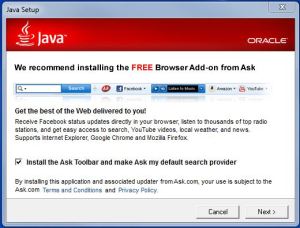
Now, Java Update is trying to install the Ask Toolbar.  The Ask Toolbar takes over your computer’s web search functions and instead of getting the useful results you expect from companies like Google and Bing, you get sent to MyWebSearch results which are primarily adverts for which Ask gets paid.  It’s very hard to tell which results are adverts, and which are the proper results that you’re looking for.

Worse still, if you make the mistake of installing the Ask Toolbar, it is hidden from the “remove software” option in Control Panel for the next 10 minutes.  The only possible reason for this behaviour is to stop people from removing the unwanted software.

In my opinion, if software you install or update also changes a different function of of your computer, then it’s a trojan; a type of virus.

So, what can you do?  Well, look out for the Java Update icon in the bottom right of your screen.  When you get it, take time to update it properly without the Ask Toolbar.

When you run the Java Updater, look out for the tick-box next to “Install the Ask Toolbar and make Ask my default search Provider”.  Untick that box, then click Next, and follow the rest of the instructions.

If you’ve installed Ask Toolbar by mistake, you can probably uninstall it (after 10 minutes) from the Add/Remove Software function in Control Panel.  If you need help or advice, please let me know.

Many people who get things like this on their computer also have other things that need clearing off and sorting out.  If you want the best experience from your computer, you can find information on my tune-up services here.  The Express Tune-up can be done remotely (via the internet), so contact me now, and within the hour you could have a faster, better computer.
