BT about to mess up your email (again)

Setting up new BT MailBT is about to move from BT Yahoo Mail (which sucked anyway) to new BT Mail. Most people are going to need to make some changes to their email settings in order to continue to use their BT email services.

If you use an iPad, tablet, phone, Outlook, Mac, Windows Live Mail, etc, you’ll probably have to change the settings. As BT admit, “it’s a bit technical” and they can’t do it automatically.

If you have read this far and don’t relish the thought of manually changing your email settings yourself, contact me now and I’ll make the transition as smooth as possible for you, and save you perhaps hours of frustration and phone calls to BT’s lovely call centre.

If you want to make the changes yourself, look out for an email from BT and follow their instructions. I’ve looked at their instructions, and they’re confusing (even to me) and wordy. Good luck!

My advice is to move away from BT email entirely. In fact, in my opinion, you should not use any email service provided by your Internet Service Provider. I’ll write another blog post soon about this, but contact me if you want to hear sooner.


My new remote support setup

image


I have new remote support software, so I set up my office to help me to provide a better service to people who need online support.

If you need remote support, go to this page www.cbits.instanthousecall.com click the blue “download” button and run/install the software. Then click start session. Easy. Takes two minutes.

Foxit Reader now comes with unwanted programs

I have to be careful here, so I don’t get sued, but my recommended PDF reading software now comes with Conduit Search and maybe SearchProtect, which some people label as malware or virus.

The latest version of the free Foxit Reader has an option during the installation to opt-out of the added software.  Since most people just click through with OK or Accept they’re unlikely to notice they are installing additional software.  Conduit and Search Protect are therefore ‘potentially unwanted programs”, or PUPs.

If you have these unwanted programs on your computer, contact me and I will remove them for you if you can’t do it yourself.

Conduit is adware, meaning it delivers adverts to people who have it installed.  It’s a ‘browser hijack’ which takes over your browser (Internet Explorer, Chrome, etc) and instead of using your chosen search engine (Bing, Google, or whoever), it uses Conduit’s search engine which delivers adverts and tracks your internet searches (and maybe other internet use).

Search Protect is software that makes it very difficult (virtually impossible) to change your search provider back to Google, Bing, or whoever you choose.

Foxit, I assume, generate income from the installations or use of these unwanted programs.  If they didn’t get income from them, why would they add them to their installation package?

These sneaky add-ins are getting more and more difficult to uninstall, and I’m seeing many more of them.  Always take time when installing software or updating software to make sure you un-tick (un-check) the additional software “offers”, even if they seem tempting.  The key is, if you dodn’t go looking for that software, don’t install it.

I will uninstall Foxit Reader from all my PCs and use an alternative (when I find one).

Again, these ‘infections’ can be difficult to remove.  Contact me if you would like me to remove them for you.

Mining Litecoin is not worth the effort

Mining Litecoin generates £0.97 profit per day (actual, real-world figures).  Conclusion: not worth the effort, and certainly not the investment.

This is based on the actual figures of my mining rig, actual hash rate, actual pool fees, actual electrivity costs, and the well-regarded Litecoin Mining Calculator for extrapolating LTC/day.

GPU: R9 280X.  691Kh/s.  Gross mining revenue 0.22LTC per day.  My rig has been pool mining for about 14 hours and seems to be performing as per the Mining Calculator.

Current LTC price c £9.50.  0.22 LTC = £2.09 per day income.

Single GPU rig averages 370W/h without monitor.  Cooperative Energy (power company) is £0.1265/KWh including 5% VAT (fuel tax).  Fuel cost is £1.12 per day.

Income minus running cost is £2.09-£1.12 = £0.97 profit per day.

Given the cost of the card alone, around £270, the break-even point is around 11 months, without any other hardware or time taken into account.

Here’s where the variables come in, the what-ifs.

What if I buy another card?  I think it will run at 250W and double the income.  Calculations show a daily additional profit of £1.33.  Break-even point 6 months 20 days.

What if LTC prices rise?  They were 50% higher on my exchange while I was researching rig building.  They may recover or fall lower, or sky-rocket.  That’s opinion, but the current facts are above.

Mining difficulty will get harder.  Maybe the increase in difficulty will offset the rising value of Litecoin.

Cryptocurrency is volitile.  Governments seem to be trying to regulate it, outlaw it altogether.  In the UK, mining income is taxable.

From a theoretical, intellectual, practical, and geek point of view it has been a worthwhile experience.  From a money and time point of view, I wouldn’t recommend it.

Netflix scam similar to the Microsoft scam

I just read this.  Please read it and familiarise yourself with how these things are perpetrated.

http://blog.malwarebytes.org/fraud-scam/2014/02/netflix-phishing-scam-leads-to-fake-microsoft-tech-support/

Never let anyone long in to your computer unless you know them personally and trust them.

If you need any help or advice, please contact me.

Remove old versions of Java to help keep your computer secure (easy guide)

Remove old versions of Java to help keep your computer secure (easy guide)

If you want to know more about Java then there is some background information after these instructions.

Let’s get straight to it.  Here’s what to do today:

1. First, check that you have the current version of Java by going here http://www.java.com/en/download/installed.jsp and clicking “Verify Java Version”, and following the on-screen prompts, including “Run” to “Do you want to run this application”.
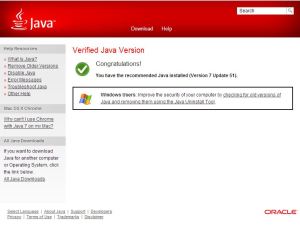
2.  When you have the recommended version, click the link (underlined text) in the box entitled “Windows Users”.  Again, Run the application when prompted.

3.  Click “I agree to the Terms and Want to Continue”.  Read the terms first, of course 😉

4.  Follow any instructions to remove old versions.

5.  When you see the page that says “There are no old versions of Java on your computer”, then you’re done for today.

If you get stuck, contact me to arrange for technical support from me.  If you’re local I can visit you, or if not I can access your computer remotely and securely (with your permission) and sort it out for you.

And, in the future:

1.  Always update Java when an update is available

2.  Be careful that it’s a genuine Java Update, not a fake one that is really a virus.

3.  When installing Java Updates, decline the extra software they recommend you install; this is a way Oracle earns money from Java, by installing other software too that generates income from them.  The generation of that income usually comes from the sale of your eyeballs by showing adverts, or your data by tracking your internet use.  See my post here http://www.bowenracing.com/2013/02/java-update-doing-naughty-things-again-trojan/

Background to Java

Java is a programming language.  You probably have it installed on your computer, phone, and tablet already.  It allows software writers to write one piece of software that will run on many types of device and operating system.  So, Java is very useful.

Unfortunately, if it’s useful for people to write software we can all use, it’s also useful to those who want to use it for bad stuff.  Virus writers, hackers, and ‘potentially unwanted program’ designers can all use the flaws (vulnerabilities) in Java to infect your devices.  Oracle, the owners of Java, then realise their software has security vulnerabilities and then ‘patch’ the holes with Java updates.

Unfortunately, the Java updates sometimes leave old versions of Java on the computer, including the security vulnerabilities, which can still be used.

If you didn’t already do it, go back to the top of this page and check you have the current version and remove old versions using my instuctions.

If you get any problems, please contact me to arrange for tech support from me.

Thanks.

SearchGol browser hijack removal

A new client called me in because they had adverts on their search page and pop-ups, and their home page was set to searchgol.com.  These browser hijacks or search hijacks aren’t just annoying, the can lead you to other websites that install more rubbish on your system, and the certainly track your internet searches and browsing history and habits.

I have had lots of this type of thing lately and usually it’s fairly easy for me to remove these search hijacks, but it was the first time I had seen SearchGol.  I removed everything as usual, but each time I restarted Chrome searchgol came back.  Internet explorer was ok, but even unistalling Chrome and reinstalling wouldn’t stop the searchgol redirect from coming back.

[EDIT: I subsequently suspect that Search Protect was being used to prevent the user (and me) from changing the search provider too.  Search Protect can also be difficult to remove]

I tried all the tools and instructions I could find when searching for a solution on Google, but none of them worked.  It had taken much longer than the time I estimated, but I was determined not to give up.  I slept on it, and had an idea.  The next evening I tried it and it worked, searchgol was gone!

I’m usually good at finding a solution on Google, but none of the solutions I tried had worked.  Sometimes, I have to rely on my own brain to solve a problem.

If you have ads showing on your search engine (or search page) then you might have a browser hijack or search hijack.  Contact me and I will arrange an appointment to remove it either in person, or by remote login to your computer.

Macbook OS reinstall

I recently had a rare opportunity to work on a Macbook.  A regular “subscriber” client called to say that her daughter didn’t need her 2008 Macbook and was giving it to her brother.  She wanted all the data removed and wanted it reset to as it was when it was new.

The sister lived in Australia, so there was no UK power supply (no power supply at all), so I recommended that the client take it to the Apple Store as third party chargers are becoming less reliable.  The new charger didn’t seem to be working properly, but it was the Macbook power socket was dirty so I cleaned it up.

There were a few problems because Mac OS had been updated, but we didn’t have the Apple ID for the person who did the update, but I overcame that problem finished the job.

Using AdBlock Plus? Support the sites you use and like by white-listing them.

AdBlock Plus - Options

Using AdBlock Plus or other ad blockers?

Please consider white-listing sites you like and find useful, it helps support them financially.

I don’t have ads on my site, I detest (almost) all advertising.  Then again, I don’t update my site very often.  For some people though, their passion or their livelihood depends on advertising revenue, the income they get from ads that are displayed on their sites, or ads on their site that are clicked.  In other cases, behemoths like Google provide us with all these ‘free’ services because they earn (huge amounts) of money from advertising.


AdBlock Plus - WhitelistIf you like a site or a service, consider helping them out by white-listing their site for ads, or making a donation directly.
To white-list a site, click on the ABP icon, click Options, and add the domain to the whitelist.

Just an idea.

Urgent: Update Adobe Flash Player asap

There is an urgent update for Abobe Flash Player that you should do.

There is a ‘zero day exploit’ in Flash that could allow a virus onto you computer just by visiting a web page.  “Zero day” means that Adobe didn’t know about the flaw in their software until someone found out that viruses were already getting onto PCs using the vulnerability.  That means that the was no protection from antivirus software either.  From what I hear, it also affects Macs and Linux (if you don’t know what that means, then you’re not using Linux).

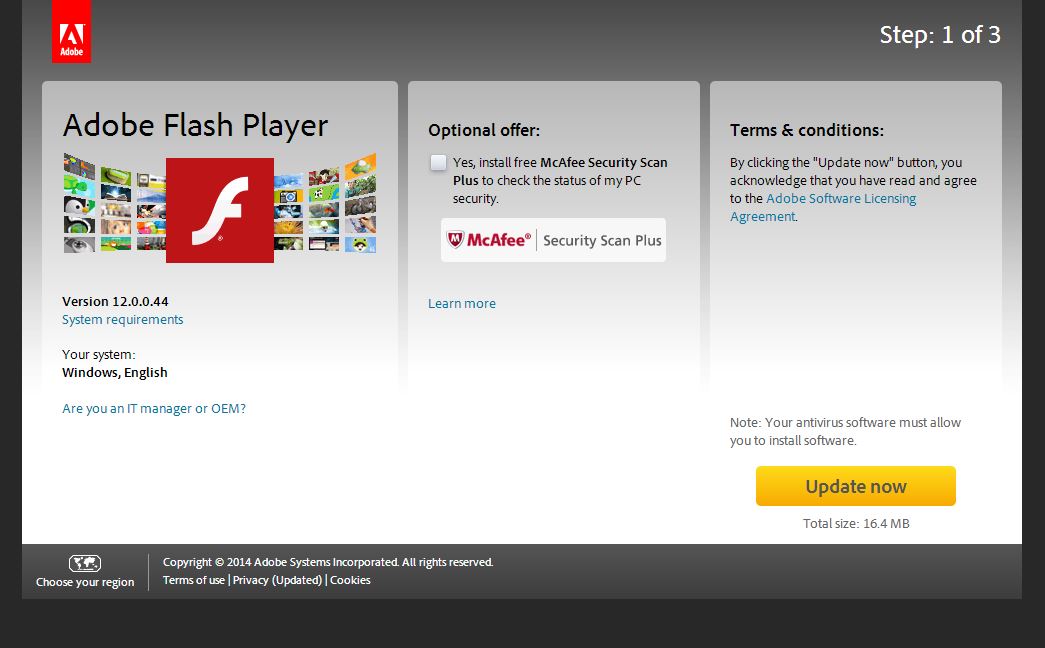
So, to protect yourself, go to this link https://get3.adobe.com/flashplayer/update/activex/.

Flash Player Update

Make sure you un-tick the “optional offer” of McAfee Security Scanner Plus (it annoys you with pop-ups, offers to scan your computer, and then recommends you buy their security software; basically it’s an advert).


Update now

Once you’ve un-ticked the “optional offer”, then click “Update now” (on the other page, not this one).


If you need any help, please contact me.

Please visit and Like my Facebook page too!  https://www.facebook.com/ColinBowenITservices

For more updates, click here