Urgent: Update Adobe Flash Player asap

There is an urgent update for Abobe Flash Player that you should do.

There is a ‘zero day exploit’ in Flash that could allow a virus onto you computer just by visiting a web page.  “Zero day” means that Adobe didn’t know about the flaw in their software until someone found out that viruses were already getting onto PCs using the vulnerability.  That means that the was no protection from antivirus software either.  From what I hear, it also affects Macs and Linux (if you don’t know what that means, then you’re not using Linux).

So, to protect yourself, go to this link https://get3.adobe.com/flashplayer/update/activex/.

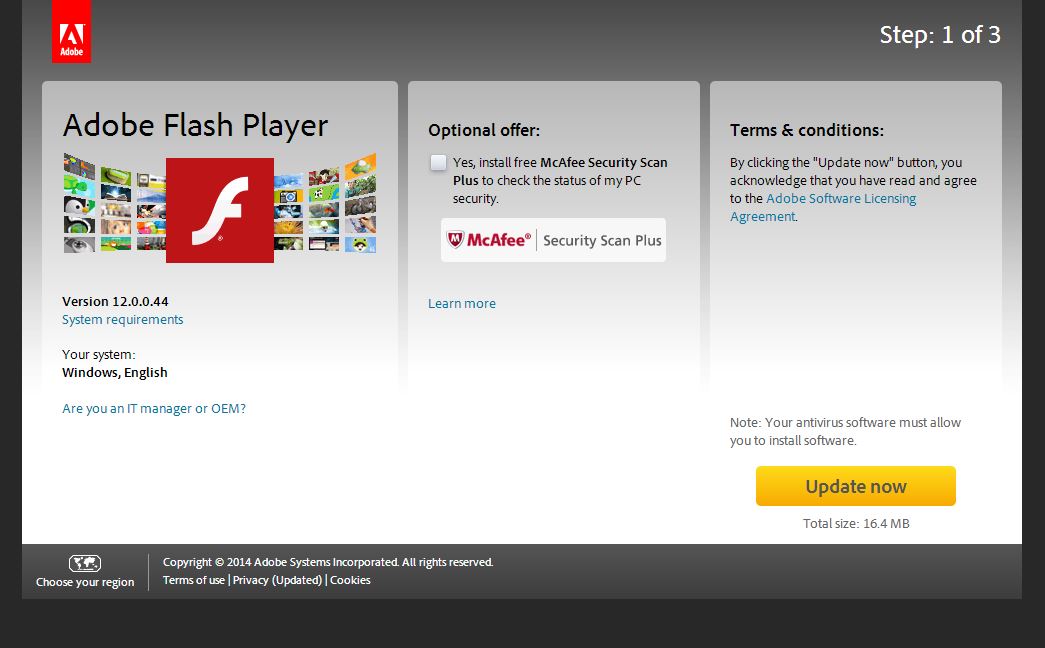
Flash Player Update

Make sure you un-tick the “optional offer” of McAfee Security Scanner Plus (it annoys you with pop-ups, offers to scan your computer, and then recommends you buy their security software; basically it’s an advert).


Update now

Once you’ve un-ticked the “optional offer”, then click “Update now” (on the other page, not this one).


If you need any help, please contact me.

Please visit and Like my Facebook page too!  https://www.facebook.com/ColinBowenITservices

For more updates, click here

Cryptolocker – a new virus that can destroy your files, even your backups, unless you pay them $/€/£300

This ransomware, called Cryptolocker, encrypts the files on your hard disk and any memory stick, external hard disk, or other storage device attached to your computer. This may include any online storage that you’re connected to. It then flashes up a warning saying your files have been encrypted and you can’t decrypt them unless you pay $300 / €300 / £300 for them to give you the decryption key. They give you a maximum of 36 hours to pay, or they destroy the key, and your files are lost forever.

A virus that extorts money from you is called ransomware.

This is a variant of the Metropolitan Police, FBI, and other types of ransomware that I have cleaned up for many clients. This one cannot be cleaned up though. Once your files have been encrypted, no-one can decrypt them without the correct decryption key.

It comes in usually through an email that have a link to a website or an attachment that you might click. It may appear to be from a friend, a bank, or anyone else. It wouldn’t surprise me if this link will be put on hacked Facebook accounts soon too. Once you click it, it executes a file and you’re infected. You pay up, or you lose your files.

If you reached this page by clicking a link on Facebook or in an email then you could have just infected yourself. You haven’t, but it’s that easy! Never click links in emails, or on Facebook or anywhere else! Go to your web browser and type in the www. name of the page you’re looking for, or google for it.

Antivirus won’t prevent infection (most of the time) because by clicking the link you run the software and most antivirus vendors don’t have protection against this yet. Let me make this clear, antivirus cannot clean this infection; it cannot decrypt your files without the decryption key! You can only get the decryption key from the scammers, and only within 36 hours of infection.

Your backups won’t help you if the backup device is connected when you get infected; they will encrypt the backups too.

Advice:

  • Never click links in emails
  • Have good backups, but don’t keep your backup device attached all the time. Only attach the backup device when you actually need to do a backup. Ask me about backup solutions.
  • Although it doesn’t help yet, have a good antivirus to prevent infection. Ask me about the one I recommend, it’s £20 one-off payment (no annual fees)

Sky email moves to Sky Yahoo Mail, and causes problems (no surprise there)

So, Sky Email has switched from Gmail to Sky Yahoo email. That’s like switching from car to a horse-drawn carriage, with a dead horse.

Firstly, you shouldn’t be using your internet provider’s email. If you switch providers, you could lose your email account.

Secondly, if you have a Yahoo (or worse, hotmail) email account, well… Call me an email snob, but they’re a bit, er, naff.

If you want with Sky Yahoo Email, or moving any email account to a better service, please contact me.

Windows XP reaches the end of its life

Windows XP has only 11 months to live, then Microsoft stops issuing security updates and Windows XP becomes insecure.

Don’t waste time or money on your XP computers, start moving to new systems now.

I can help, with buying advice, set-up, transfer of data, and training if you need it.  Contact me now for a no-obligation discussion.

Java Update doing naughty things again – Trojan

In this post, I will explain how Java Updater tries to install unwanted software on your computer, what could happen if it does, and what simple steps you should take to prevent it.

Java is installed on most people’s computers; it’s a programming language that is required on many websites and some software.  It’s also a target for hackers, so you need to keep it up to date.  Unfortunately, when you update Java, it tries to install software you don’t want too.

In September, I explained on Facebook (CBits on Facebook – please Like) that Java Update would install some McAfee software which slows down the computer and would then bug users to buy the full version.
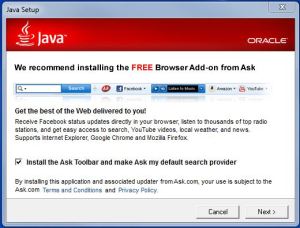
Now, Java Update is trying to install the Ask Toolbar.  The Ask Toolbar takes over your computer’s web search functions and instead of getting the useful results you expect from companies like Google and Bing, you get sent to MyWebSearch results which are primarily adverts for which Ask gets paid.  It’s very hard to tell which results are adverts, and which are the proper results that you’re looking for.

Worse still, if you make the mistake of installing the Ask Toolbar, it is hidden from the “remove software” option in Control Panel for the next 10 minutes.  The only possible reason for this behaviour is to stop people from removing the unwanted software.

In my opinion, if software you install or update also changes a different function of of your computer, then it’s a trojan; a type of virus.

So, what can you do?  Well, look out for the Java Update icon in the bottom right of your screen.  When you get it, take time to update it properly without the Ask Toolbar.

When you run the Java Updater, look out for the tick-box next to “Install the Ask Toolbar and make Ask my default search Provider”.  Untick that box, then click Next, and follow the rest of the instructions.

If you’ve installed Ask Toolbar by mistake, you can probably uninstall it (after 10 minutes) from the Add/Remove Software function in Control Panel.  If you need help or advice, please let me know.

Many people who get things like this on their computer also have other things that need clearing off and sorting out.  If you want the best experience from your computer, you can find information on my tune-up services here.  The Express Tune-up can be done remotely (via the internet), so contact me now, and within the hour you could have a faster, better computer.
Windows Update Time

It’s that time again, and Microsoft has just released it’s second biggest ever batch of Windows Updates.

If you haven’t done so already, look for the icon for Windows Updates in the bottom right of you computer screen.  If you hover over each one in turn, their labels will pop up so you can identify them.  When you find it, double-click it and follow the instructions.  They require downloads of big files, then you install them, and you will need to reboot your computer.

If you have any problems, please get in touch.

Thanks,

Colin.

Google: change for change’s sake

Google are at it again! They’re changing lots of things including the layout of Google Reader and Google Docs, and they’ve virtually hidden the ‘cached results’ from Google Searches.

I am sad to say that the New Look is here to stay on Google Documents (and Google Reader by the looks of it). I prefer the ‘classic view’ of gDocs but they’ve taken away that option. How very Apple of them.

It looks like there’s no way to get back the old interface of gReader either, although I haven’t thoroughly researched that point as I don’t use gReader at the moment.

Regarding cached results in Google searches, there used to be a link just under the search result for the cached copy, but now you have to hover over the double arrow to the right of the search result, wait for the page preview to load, then select ‘cached’ from the link at the top. Considering Google’s efforts to make search quicker, this change seems counter-productive.

It seems that Google has moved it’s focus from functionality to appearance.

In haste,

Colin.

Google’s interest-based advertising looks like Phorm/Webwise/spyware

Google will replace their current Adsense advertising with Phorm-style interest-based advertising with effect from 1st April 2009.  They’re advising website owners to update their privacy policy becuase of this, but I don’t think that doing that is sufficient.

Their current Adsense ads show advertisements that are based on the content of the site on which the ads are shown.  For example, on this site the ads might include F1 race tickets or karting companies.  Google’s new Interest-based ads will show ads based on websites that the person has previously visited.  So, when someone visits a site that contains Google ads, Google assumes that the person is interested in the content of that site and records that person’s interest in it.  When that person visits another site with Google ads, Google will show ads based on the database of what Google considers interesting to that person.

This sounds like the Phorm (AKA Webwise) privacy scandal that BT and other ISPs got into before.  Basically, they installed equipment an advertising company’s equipment that monitored websites their customers visited, and served adverts related to those previous websites.  The Information Commissioner (Data Protection Act) and the EU law enforcers were concerned that privacy was being breached.  It seems that BT (and maybe Virgin and TalkTalk) are going to introduce this spyware-like technology at some point in the future.

Getting back to Google, they sent an email to website owners saying “your privacy policy will need to reflect the use of interest-based advertising”.  Well, I don’t have a privacy policy because I don’t collect personal data.  I’m certainly not going to spend time and money getting one drawn up so Google can earn more money by placing interest-based ads on my site; ads that might have nothing to do with the content of my site.

And having a privacy policy for a website is not sufficient legally, in my opinion.  In order to view the privacy policy, someone has to visit my website.  By visiting my website, their visit is logged by Google before the person has a chance to decide whether they want that data recorded or not.  So, in effect, data about their visit is collected without their consent, and that’s illegal in the UK.

Quite simply, this whole thing worries me.  It sounds like spyware.  After all, people’s browsing habits are being tracked without their express permission, and that to me is spyware.  So, come 1st April, my site will no longer be showing Google ads.  That leaves more space for me to add things that my visitors actually want to see.

Comments welcome, for or against.

Tax Man loses our personal details (including bank details) in the post

If you’re worried about the data security breach of Her Majesty’s Revenue & Customs (HMRC) where two CDs containing personal details of all Child Benefit claimants were lost in the post, visit my other website at www.CBits.vox.com where I will post more information.  The data lost includes names, addresses, dates of birth, National Insurance numbers, Child Benefit numbers, and bank details of all Child Benefit claimants and their children.

Site update – make me your homepage

I’ve got rid of the Google Ads and replaced them with a Google Search Bar. You can search just this site, or the entire web, just click the appropriate radio button.

Please help me make this website more successful. You can do this by making this site your home page, and by using the Google Search Bar for everything you need to find or buy.

I want to be open about this, I get a small income every time someone clicks an add from the “Ads by Google” box on the search results page. This is the same income generation that companies like Virgin Media use, so instead of generating more income for them, why not help me?

So, if you want to make this site your home page:
In Internet Explorer, go to Tools, Internet Options. On the General tab, click ‘Use current’.
In Opera, go to Tools, Preferences. On the General tab, click ‘Use current’. You can also set the ‘Startup’ option to ‘Start with home page’.

Thanks very much.